5 Essential Tips for Choosing the Right Single Pole Single Throw Switch for Your Home
Introduction
A single pole single throw switch performs a straightforward job: it opens or closes one electrical path. Choosing the right version takes more thought than recognizing an on-off symbol. A wall rocker, a small illuminated panel switch and a rotary battery switch can all offer an on-off action while belonging to very different applications.
My camper van purchase catalog contains the latter two formats. Looking at them together makes the selection problem easy to see. The face tells you how to operate the control; the documentation explains what it can switch, how it mounts and how its connections work. A familiar shape cannot answer those questions.
This guide follows five decisions: choose the contact action, match the electrical rating, identify the load, plan the physical interface and check the complete system connection. Those decisions work for understanding household switches and for comparing the component controls that appear in workshop and camper projects. The examples below separate each decision so the final choice has a clear reason behind it.
Overview of Switch Types
Switch names combine several independent features. Pole and throw describe the contact arrangement. Toggle, rocker, pushbutton and rotary describe the actuator you move. Maintained and momentary describe what happens after you release it. Illumination describes another feature, with its own electrical requirements.
For contact arrangements, start with four abbreviations. SPST means single pole, single throw: one path can open or close. SPDT means single pole, double throw: one common contact can select between two contacts. DPST means double pole, single throw: two separate paths open or close together. DPDT means double pole, double throw: two changeover contact sets move together.
Toshiba’s pole-and-throw explanation provides a useful reference for the terminology. In a mechanical switch, the linked contact sets share an actuator. That mechanical link does not itself join the separate electrical paths.
A maintained on-off rocker stays where you leave it. A momentary pushbutton returns after release. Either behavior can use a single switched path. Likewise, a double-throw model may have two operating positions or an additional center-off position, depending on its specified action.
For home shopping, another vocabulary appears: single-pole, three-way and four-way wall switches. These names describe particular household control arrangements. A three-way wall switch is not a three-pole switch. Keeping the household names beside the contact terminology prevents a surprisingly common purchasing mistake.
Importance of Choosing the Right Switch
A good switch choice begins with a sentence describing the job. “One wall control turns this light on and off” is useful. “Two locations control the same hallway light” describes a different job. “A panel button sends a request to a controller” is different again, even when the visible result is a light turning on.
The first essential tip is to settle that action before comparing colors, prices or current numbers. Decide whether the control needs a maintained state, a momentary command or a choice between functions. Then identify how many separate contact paths move with it.
This approach also keeps replacement shopping focused. Start with the existing device’s model, circuit function and connection information. A new control that resembles the old one may have a different contact arrangement, lamp circuit or termination method. Photographs of the front and the product markings are more useful together than either is alone.
In my Tools & Materials catalog, product pages distinguish purchased components from alternative options. That same distinction matters here. An alternative becomes a candidate because it answers the same selection questions, not because its listing uses the same keyword.
The result is a shorter, stronger shortlist. Instead of comparing every red rocker online, compare the few models with the right action, documented rating, mounting format and connections. Appearance becomes a meaningful final choice after the underlying requirements are established.
Try a simple sorting exercise before opening product listings. Put the project into one of three groups: a household wall control, an equipment replacement or a new component panel. The group determines which documents and physical details you need first. A wall control starts with the room’s existing arrangement; an equipment replacement starts with the equipment record; a new panel starts with the intended circuit behavior and enclosure.
Then write down what would make a candidate unsuitable. An incorrect action, an incompatible connection or a mounting mismatch can eliminate a product immediately. This keeps the comparison efficient and leaves more time to examine the candidates that answer the actual project requirements.
Understanding Single Pole Single Throw Switch
The simplest way to understand SPST is to follow the contact path. There is one pair of switching contacts and one connected state. Opening those contacts interrupts that path; closing them completes it. Everything added around that basic function deserves its own line on the selection checklist.
Definition and Functionality
“Single pole” identifies one switched contact path. “Single throw” identifies one available connected path for that pole. Off is the open state, rather than a second throw. That explains how a switch with two physical positions can still be single throw.
An ordinary unilluminated SPST component often has two switching terminals. An illuminated model can have another connection for its indicator. Counting three terminals and assuming SPDT would confuse the lamp connection with a changeover contact. The contact drawing and terminal identification establish the function.
The red Mxuteuk rockers in my purchase catalog illustrate that distinction. Their current listing identifies an SPST on-off action and an AC-powered indicator. The photographs show a round body, snap-in retaining features and three rear blades. Those visible details help compare the mounting and interface; the listed indicator supply explains why the extra connection matters.
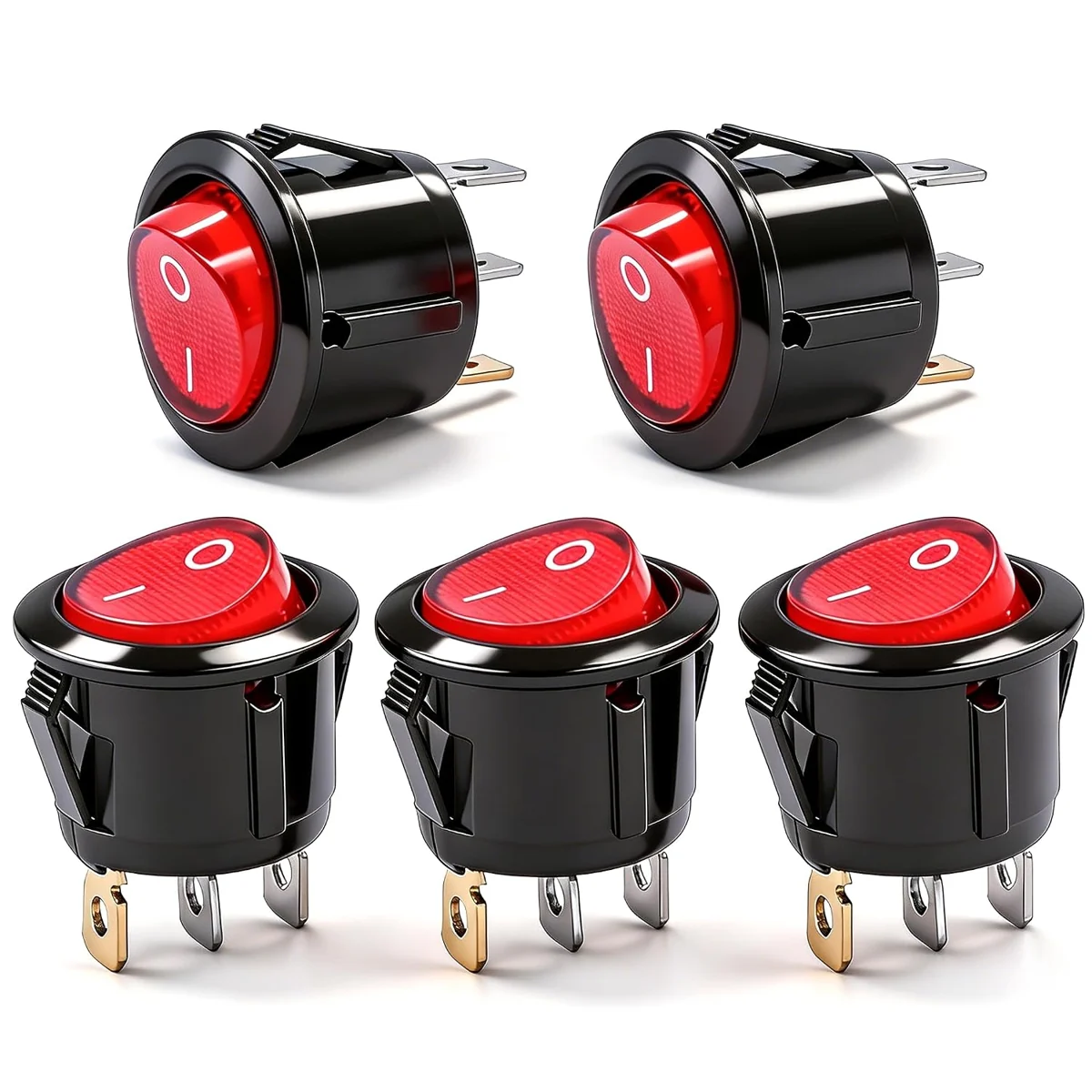
Mxuteuk Red AC Rocker Switches
These round snap-in rocker switches provide an on-off position and a red indicator. The three-pin format separates the switching and indicator connections.
View on AmazonSee the Mxuteuk rocker purchase page for the catalog record and alternatives. In this guide, it serves as an example of an illuminated component switch. A household wall switch is a separate product format with its own mounting and application specifications.
There is another useful distinction between the contact state and the control’s resting behavior. A normally open momentary switch closes while operated and opens after release. A maintained on-off switch holds its selected position. A circuit that expects a brief command and one that expects a sustained connection can therefore need different products despite both using SPST contacts.
Indicator behavior is another separate choice. An illuminated control may show that a supply is present or that the switched output is active, depending on its internal design and connections. Write down the behavior you want and compare it with the manufacturer’s diagram. The lens color alone says nothing about when the lamp lights.
For a shortlist, record four things together: contact arrangement, operating action, terminal identification and indicator function. This makes product comparisons much clearer than treating “on-off switch” as a complete specification.
Comparison with Double Pole Switch
A double pole switch operates two separate contact paths through one actuator. In a DPST version, both paths have an open and a closed state. In a DPDT version, each pole changes between two contacts. “Double pole” therefore leaves the throw arrangement unstated until the rest of the specification supplies it.
Linemaster’s contact-type guide describes these linked arrangements. Thinking of DPST as two SPST contact sets operated together is useful. Thinking of it as two wall-control locations is a different concept altogether.
| Type | Separate poles | Connected choices per pole | Basic action |
|---|---|---|---|
| SPST | One | One | Open or close one path |
| SPDT | One | Two | Select between two contacts |
| DPST | Two | One | Open or close two paths together |
| DPDT | Two | Two | Change two contact sets together |
Pole count does not establish the current rating. A small double-pole signal switch can have a lower load rating than a large single-pole power switch. Nor does the abbreviation establish whether a product is intended for household AC, vehicle DC or a controller input.
For a home light controlled from two locations, the relevant comparison is usually between the existing household switching arrangement and a compatible three-way arrangement. Leviton explains three-way switching in those terms. Simply adding a second pole to one device does not create two-location control.
Benefits of Single Pole Single Throw
SPST is easy to describe and easy to represent on a contact diagram. When the job needs one maintained on-off path, the action corresponds directly with the desired result. Product labeling and an appropriate actuator can make that result clear to the person using it.
The simplicity also makes comparison easier. You can focus on the electrical and mechanical requirements without evaluating unused changeover contacts. Fewer required functions can narrow the shortlist, although the final price still depends on construction, sealing, materials and product format.
The strongest benefit is a good match between function and use. An uncomplicated action is valuable when it does exactly what the project needs. That value comes from the match, rather than an assumption that single-pole products are universally smaller, cheaper or more capable.
Key Considerations When Selecting a Single Pole Single Throw Switch
With the contact action settled, turn the shortlist into a set of comparable records. Give every candidate the same fields. The three sections below cover the remaining four tips: electrical rating, load behavior, physical interface and system compatibility.
Amperage and Voltage Ratings
The second essential tip is to read voltage and current together, including the AC or DC designation. A current number without its voltage and load conditions is incomplete. The useful specification is the complete rating for the application being considered.
For example, Leviton’s 5601-2E wall-switch page identifies a single-pole model rated 15 A at 120/277 V AC. That is a concrete product example, rather than a universal rating for every single-pole switch. A similar-looking device can carry different markings and termination requirements.
For DC equipment, look for the manufacturer’s explicit DC switching information. Converting an AC rating with a rule of thumb does not create a documented DC rating. My camper purchase catalog includes components with very different intended electrical contexts, so keeping the AC/DC field visible prevents an unhelpful comparison.
The Blue Sea 9003E is an example of a rotary on-off battery component. Its large handle and rear studs distinguish it physically from the small rocker. More importantly, its manufacturer documentation separates different current conditions rather than offering one interchangeable number.
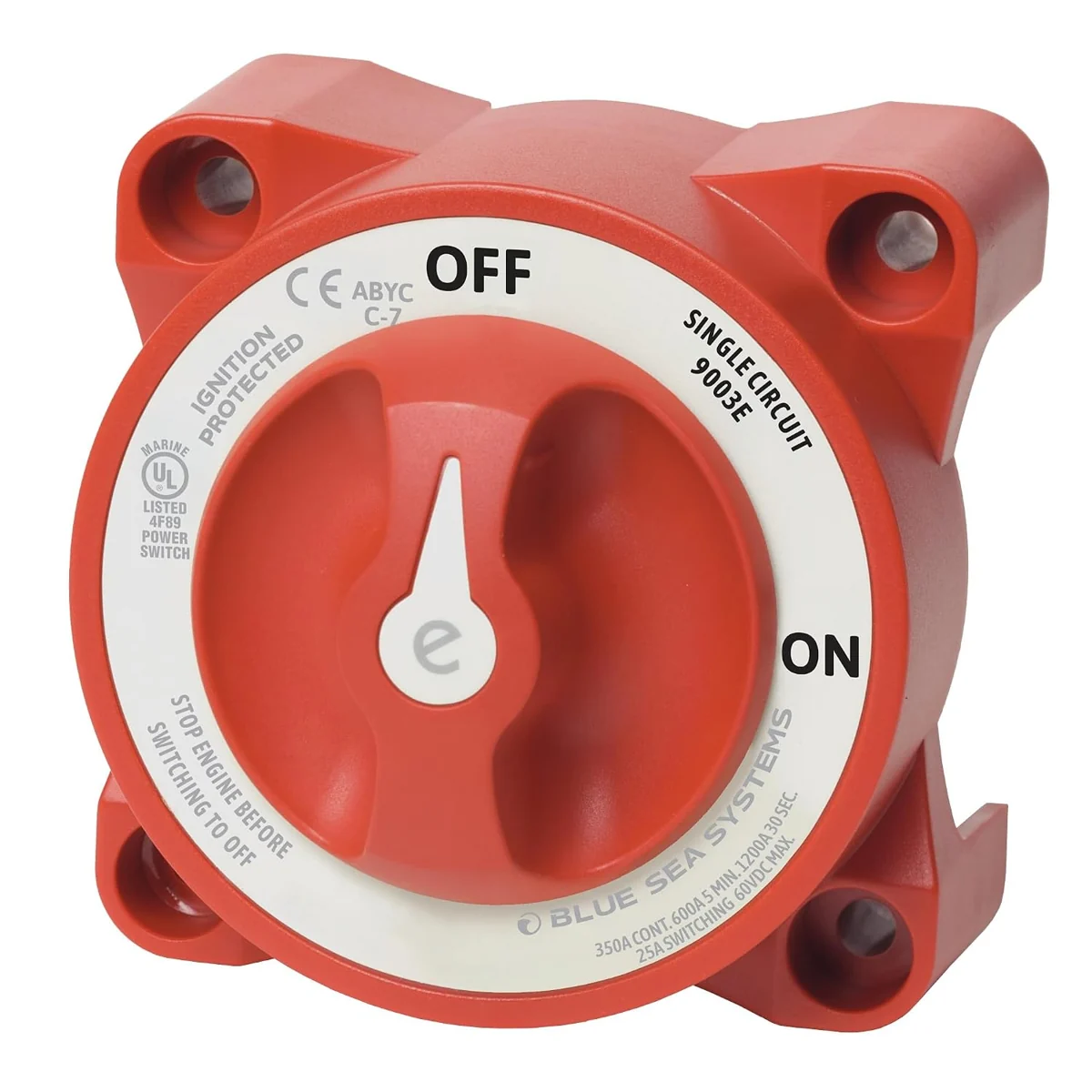
Blue Sea 9003E Battery Switch
The Blue Sea 9003E is an e-Series rotary battery switch with on and off positions. Its red control turns within a mounting body with rear connection studs.
View on AmazonThe Blue Sea purchase page records the component in my catalog. Blue Sea’s current 9003E documentation distinguishes continuous, cranking and switching ratings. A continuous carrying rating describes a different operating condition from opening or closing contacts under load. Keep the exact model and document revision with the comparison.
The third essential tip is to identify the load itself. A steady current reading is only one part of its behavior. Lamps, motors, power supplies and small controller inputs can present different switching requirements. The load category should appear beside the voltage and current in your notes.
Startup current, often called inrush, can differ from the normal running current. A motor also behaves differently from a simple resistive load. Omron’s switch application guidance explains why load type, starting conditions and contact specifications matter. Its discussion also distinguishes small signal loads from power switching.
Consider a hypothetical shortlist for a small powered device. Candidate A publishes an appropriate rating for that load category. Candidate B displays a larger headline current number but supplies no comparable load information. Candidate A gives you a better basis for comparison because its documentation answers the actual question.
For a controller input, compare the specified minimum load and contact behavior where applicable. “Higher amperage” is not a complete measure of suitability for a tiny signal. For a motor control, compare the motor-related rating and operating conditions. These are different selection exercises even if both controls have identical on-off legends.
Also distinguish direct load switching from sending a command. A small panel control may operate a relay or controller input while another device switches the load. In that arrangement, the panel switch is evaluated against its own contact circuit. The controlled equipment’s total wattage is not automatically the current through the button.
A useful comparison worksheet has separate boxes for supply voltage, AC/DC, normal load, starting behavior, load category and switching frequency. Add the document location for each answer. Blank fields identify research still needed before choosing between candidates.
Finally, compare electrical endurance with the stated test conditions. A mechanical cycle figure and an electrical life figure describe different things. For a frequently operated control, the relevant published electrical conditions are more informative than a large unlabeled lifetime claim in a marketplace title.
A worked arithmetic example shows where calculation helps and where the product documentation takes over. Suppose a hypothetical DC load is specified as 24 watts at 12 volts. Dividing power by voltage gives a nominal current of 2 amperes. That establishes one comparison field, rather than a complete switch selection. The next fields are the load category, startup behavior and the candidate’s documented DC switching conditions.
Now suppose another device also draws 2 amperes during normal operation but has a different startup characteristic. The matching running-current numbers do not make their switching requirements identical. Keep both devices on separate worksheet rows and compare the appropriate documentation for each.
The same discipline helps when a product listing presents several ratings. Copy each number with its units and conditions, then label the condition in plain language. A comparison written this way is easier to review than a column containing only the largest amperage printed on each package.
Design and Aesthetics
The fourth essential tip is to plan the whole physical interface. That includes the part you touch, the opening it occupies and the space behind it. A switch can meet the electrical requirements and still be the wrong shape for the available installation.
For a household wall control, compare the device style with its intended wall box, plate and surrounding controls. A traditional toggle and a broad rocker offer different visual and tactile experiences. The choice should feel consistent with how the room is used, especially when several controls sit beside each other.
For a component panel, record the manufacturer’s cutout dimensions and supported panel thickness. Round snap-in bodies, rectangular rockers and threaded toggles use different mounting arrangements. The overall face dimensions do not tell you the required opening.
The Mxuteuk product photograph is helpful here. Its retaining features sit behind the front rim, while the terminals extend farther behind the body. A layout based only on the visible red face would omit much of the space the component occupies.
Measure the complete depth envelope, including the specified connectors and room for the conductors to approach them. The panel may also need clearance for nearby equipment, a cover or the movement of an adjacent drawer. A simple side-view sketch makes these relationships easier to compare.
E-Switch’s selection guide treats mounting, termination, action, illumination and environmental features as distinct choices. That is a useful way to organize a panel layout: solve each field, then check that the chosen model combines them.
Think about the user’s hand as well. A protruding toggle may be easy to locate by feel but occupy more space in front of a panel. A flush rocker may suit a compact surface. A rotary handle has a different sweep and grip. Compare those movements with the actual access route.
Labels deserve the same attention as finish. A short functional label, consistent orientation and readable contrast help a row of controls make sense. Decide whether the user needs to identify the controlled device, the selected state or both.
Indicator brightness also affects the interface. A light useful on a daytime workshop panel may be distracting beside a sleeping area. Record the intended viewing conditions and the specified indicator supply. Matching a preferred lens color comes after those requirements.
For my van planning, the useful connection is how controls fit into a larger physical project. My Day 104 roof-wiring diary documents routing and connections around the roof equipment. A purchase record and a project diary answer different questions: one identifies an item, while the other records the work carried out.
A paper layout can settle many aesthetic choices before a panel is made. Mark the actuator outlines, label areas and hand clearance at full size. Compare a few arrangements against the way the controls will be approached and read. This turns appearance into a practical part of selection.
Rehearse a normal sequence of use against that layout. Imagine entering the room, reaching the panel and identifying the desired control. For a workshop bench, include the position of the workpiece and nearby storage. For a camper interior, include the position from which a control would be read or reached.
Also sketch the rear view separately. Two actuators with comfortable spacing on the front can have overlapping connector or conductor space behind them. Showing both sides on the same planning sheet helps reveal that mismatch while the layout is still easy to change.
Compatibility with Other Wiring Systems
The fifth essential tip is to compare the complete connection arrangement. The selected switch must fit the circuit function, terminal system, indicator supply and surrounding controls. A matching front panel does not establish compatibility behind it.
Start with the exact model number and its terminal diagram. Identify the switching contacts separately from illumination connections, protective connections or electronics. Use the manufacturer’s terminal names in your project notes so a generic drawing cannot be mistaken for the product’s own layout.
Next, identify the termination method. Screw terminals, quick-connect blades, lead wires and circuit-board pins belong to different mechanical interfaces. Connector dimensions and conductor requirements are part of the product selection, rather than details to improvise after delivery.
Leviton’s product information illustrates why the termination method matters even within the household wall-switch category. Different connection methods can have different stated conductor requirements. Compare the exact model’s instructions and specifications with the existing wiring arrangement instead of applying another model’s requirements.
Illumination creates a second compatibility question. The contact rating and lamp supply may be different specifications. An AC indicator in a component switch is not identified as a vehicle-voltage LED merely because the actuator is red. The Mxuteuk listing makes its AC indicator part of the model description.
For a smart-home control, compare the electronics and system requirements as well as the visible on-off action. A mechanical contact, an electronic wall control and a wireless scene button can produce similar outcomes through different architectures. Their supply needs and load compatibility come from the exact product documentation.
Multi-location operation belongs on the worksheet too. Identify whether the project needs one control point, a conventional multi-location wall arrangement or a manufacturer-specific companion system. Buying a double-pole component does not answer that question.
The operating environment is another system requirement. Compare the published temperature range, enclosure arrangement and any specified protection rating with the actual location. A rating for the actuator face may describe a different boundary from a rating for an entire assembled enclosure.
For replacements, keep a small compatibility record: old model, new candidate, contact action, terminal identification, mounting dimensions, conductor interface, load rating and associated controls. Add clear photographs of markings and the enclosure geometry. That record makes differences visible before the purchase is final.
For new projects, write the expected behavior in plain language. “Press briefly to send a command” implies a different interface from “leave this control in the selected state.” The component specification should reproduce that sentence through its contact action and operating behavior.
Compatibility is therefore a chain of answers, not a single badge on a listing. The best candidate is the one whose documentation connects every required field: function, electrical conditions, physical fit, connections and the way the complete system operates.
| Field | Record for each candidate |
|---|---|
| Identity | Exact model, variant and document reference |
| Action | Contact arrangement and maintained or momentary operation |
| Electrical conditions | Voltage, AC/DC, load category and applicable ratings |
| Physical fit | Mounting format, cutout, thickness and rear clearance |
| Connections | Terminal functions, termination method and indicator supply |
| Interface | Labels, actuator movement and required state indication |
Keep a source beside each entry so the comparison remains traceable throughout the selection process. A product photograph can support the visible shape, while a dimensioned drawing supports the mounting measurements. A contact drawing supports the switching arrangement. Using the right evidence for each field avoids asking one marketplace image to establish everything about a component.
Applications of Single Pole Single Throw Switch
Applications become easier to compare once the five decisions are separated. The same contact idea can appear in a room light, a component panel or an equipment control, while the appropriate product changes with the job.
Residential Use Cases
A familiar residential example is one wall location controlling one lighting circuit. A suitable single-pole wall switch provides a maintained on-off action. Selection then turns to the specific electrical rating, load compatibility, wall-box arrangement and preferred actuator style.
For a straightforward room update, appearance may be the most visible goal. Still, the useful shortlist starts with compatible devices and then compares finish, plate shape and feel. That sequence avoids choosing a beautiful faceplate around a device that does not serve the existing control arrangement.
A hallway with controls at both ends presents a different requirement. Record the two-location behavior first and compare the appropriate household switching products. The words “two pole switch” do not describe the number of places from which a light can be controlled.
An appliance or workshop enclosure can contain a component rocker with an SPST function. Here, the equipment’s model documentation, mounting opening, load and indicator requirements shape the selection. A small panel component and a wall-box device are evaluated within their respective product categories.
A hobby control panel offers another useful comparison. If a button sends a low-current signal to electronics, compare contact characteristics for that input and the required momentary or maintained action. If a switch directly controls a load, compare its documented switching conditions for that load.
For a reading area or bedroom, consider how the control will be recognized in low light and whether an indicator is desirable. For a workshop, think about labels, hand access and the visibility of the selected state. These choices refine a technically compatible shortlist.
My van catalog adds a practical contrast to these home examples. The small illuminated rocker and the rotary battery component show how far two on-off controls can differ. Their product images make that physical difference obvious; their documentation supplies the less visible electrical differences.
A useful residential buying note can fit on one page. Describe the controlled function, number of control locations, existing device type, load category, mounting arrangement and preferred appearance. Attach the exact candidate model information. That gives every comparison a consistent starting point.
Imagine updating a room with one existing light-control location and a row of matching wall plates. The shopping sequence begins with that single-location arrangement and the connected lighting load. Next comes the compatible device format and connection method. Only then do finish, rocker shape and plate coordination decide between the remaining candidates.
Compare that with adding a control to a small project enclosure. The starting information changes to the circuit behavior, supply, load or controller input, enclosure opening and available depth. The desired result may still be on-off operation, but the shortlist comes from the component category. Keeping these two examples separate makes the selection process clearer.
Industrial Uses
Equipment controls use the same pole-and-throw vocabulary. An SPST contact can provide an on-off input or a discrete command within a larger control system. Its suitability depends on the equipment design and the particular contact circuit.
Moniteur’s contact-arrangement explanation is useful for understanding how single and linked changeover contacts differ in equipment applications. The contact symbol describes a relationship between terminals; it does not establish the function of the entire machine.
For an equipment replacement, start with the manufacturer’s specified part and control function. Compare actuator action, contact configuration, electrical conditions, mounting and environmental requirements. A generic on-off replacement can look plausible while changing the way a control input behaves.
Operating frequency also changes the comparison. A control used occasionally and one actuated repeatedly throughout a working day present different service demands. Published endurance figures become useful when their electrical and mechanical test conditions match the comparison being made.
The distinction between command and load is particularly useful here. An operator control may send a signal to a relay, contactor or controller. Understanding that architecture identifies which circuit the contact actually switches and which ratings belong to other components.
Maintainable documentation helps the next replacement too. Keep the equipment model, switch part number, contact diagram and mounting drawing together. That information makes future sourcing more precise than a photograph of a worn actuator alone.
Alternatives: Two Pole Switch and DPST
A 2 pole switch becomes relevant when two separate paths must move together. DPST supplies an open-or-closed action for both paths. DPDT supplies changeover action for both. The required contact relationship decides between them.
Read the drawing one pole at a time. In the DPST example, each row is a separate switched path. The linked actuator moves both rows, but the dashed mechanical line is not an electrical connection.
If you searched for “diagram dpdt switch,” follow the common contact on each row and compare the selected destination. A center-off variant adds an open position when specified. The diagram explains contact action without assigning physical pin numbers to a particular product.
Choose SPDT when one path needs to select between two contacts. Choose DPST when two paths need a linked on-off action. Choose DPDT when two paths need linked changeover action. Then repeat the same electrical, load, mounting and compatibility checks used for SPST.
The alternative is worthwhile when it supplies a required function. More poles or throws are not an automatic upgrade. A precise contact requirement keeps the comparison anchored to what the project actually needs.
One useful reading exercise is to describe each contact drawing without naming an application. For SPST, say “this pair connects or separates.” For DPST, say “these two pairs connect or separate together.” For DPDT, say “each common selects one of two contacts, and both selections move together.” This exercise separates the contact mechanism from assumptions about what someone might connect to it.
After that, add the application requirements as another layer. Voltage, load category, terminals and enclosure fit still need their own answers. The schematic vocabulary stays the same while the suitable product can change substantially.
Finally, compare the selected position with the manufacturer’s operating-action notation. A product described as on-on differs from one described as on-off-on, and a momentary version adds another behavioral distinction. Recording the notation beside the drawing keeps those differences visible when several similar models share a product page or belong to the same switch family in a manufacturer catalog.
Conclusion
Choosing a switch is a sequence of connected decisions. Starting with the intended behavior and ending with a documented model makes the result easier to explain, compare and revisit.
Summary of Key Tips
- Choose the contact action. Decide whether the job needs one on-off path, a changeover or linked paths. Record maintained or momentary behavior separately. For household lighting, identify the required number of control locations.
- Match the electrical rating. Read voltage, current and AC/DC conditions together. Keep carrying and switching ratings distinct, and retain the exact model documentation used for the comparison.
- Identify the load. Compare the specified load category, normal operation and starting behavior. Establish whether the switch controls the load directly or sends a command to another device.
- Plan the physical interface. Check actuator movement, mounting dimensions, panel or box fit, rear clearance, labels and viewing conditions. Compare appearance within the shortlist that meets those requirements.
- Check the complete system. Match terminal functions, termination method, indicator supply and associated controls. Keep the circuit relationship and product mounting information together in the project record.
These five tips turn a vague search into an orderly comparison. A candidate earns its place by answering the same questions as the other candidates. The best result is a switch whose function and documented requirements match the project clearly.
Final Thoughts on Switch Selection
The single pole single throw switch remains useful because its basic function is easy to understand: one path is either open or closed. The choice becomes clearer when the contact arrangement, operating behavior and product format are treated as separate features.
My purchased switches provide two tangible examples of that approach. A small illuminated rocker makes indicator connections and panel fit easy to discuss. A rotary battery component makes the distinction between carrying and switching conditions more visible. Each belongs in a comparison shaped by its own documented application.
Use the contact drawings to understand the vocabulary, then move to the exact candidate’s documentation for the selection. Keep a short record of the job, the electrical conditions, the load, the available space and the required connections.
For more project context, explore the Electronics & Controls library, the original build diary and my Tools & Materials hub. Together, the explanations, purchase records and project notes provide a clearer basis for understanding how a component fits into a larger build.