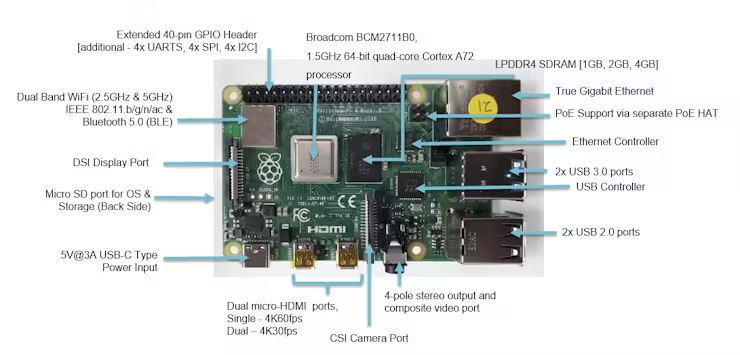
These archived diagrams label the main connectors and components of a Raspberry Pi 4 board. Use them as an orientation reference while identifying the hardware in front of you, rather than as a complete specification for every Raspberry Pi model.
Read the two board images in context
The diagrams point out the GPIO header, USB connections, Ethernet connector, display and camera connections, micro-HDMI sockets and USB-C power connector. Their memory labels differ: one illustrates an 8GB example, while the other lists earlier memory options. Neither image establishes the memory or revision of your own board.
Keep the board's printed model information and your purchase or hardware record together. A connector that looks similar in a different product photograph is not enough to establish that an accessory or enclosure fits.
Plan the physical connections
- Board identity: exact model, revision where known, and the source used to identify it.
- External connections: which ports the project needs and where each cable must enter or leave the enclosure.
- Accessory details: exact display, camera, storage or expansion-board documentation.
- Access: room to insert and remove connectors, reach the storage card and service the assembly.
- Open questions: any unresolved power, cooling or mounting requirements, recorded separately from the port layout.
Original board-reference diagrams

Connect the reference to the project record
Use the GPIO reference page for the separate distinction between header position and GPIO numbering. Consult Raspberry Pi's hardware documentation for the relevant model's requirements before selecting a supply or accessory. Keep the source and remaining questions in the decision log.
For the monitoring components I used in the van, see my SmartShunt and Raspberry Pi equipment.
This gallery identifies parts in archived illustrations.
Reference guide expanded October 20, 2026. Original publication date and archived references retained.