A Raspberry Pi pinout maps each position on the GPIO header to its electrical label and function. It lets you distinguish a physical pin number from a GPIO identifier, and a signal connection from a power or ground connection.
This guide covers the standard 40-pin header used by Raspberry Pi 4 and other compatible 40-pin models. Start with the exact board model and its pin-1 marker, then match the numbering used by your software.
Physical Pin Numbers and GPIO Numbers
Physical numbering describes the connector positions, from 1 to 40. GPIO numbering identifies the signal: for example, GPIO17 is at physical pin 11. The two numbers describe the same connection from different perspectives.
GPIO Zero uses BCM-style GPIO numbers for ordinary integer pin arguments. Its LED(17) example refers to GPIO17, at physical pin 11. The library also accepts explicit forms such as "GPIO17" and "BOARD11". GPIO Zero's numbering documentation explains those equivalents.
Write both identities in a project note: physical pin 11 / GPIO17. That keeps the connection understandable when you move between a diagram and a software example.
Raspberry Pi 40-Pin Header Map
Each row below pairs adjacent odd and even physical positions, beginning at the pin-1 end. Locate pin 1 on the actual board or its connector drawing to orient the table.
| Physical pin | Label | Physical pin | Label |
|---|---|---|---|
| 1 | 3V3 | 2 | 5V |
| 3 | GPIO2 | 4 | 5V |
| 5 | GPIO3 | 6 | GND |
| 7 | GPIO4 | 8 | GPIO14 |
| 9 | GND | 10 | GPIO15 |
| 11 | GPIO17 | 12 | GPIO18 |
| 13 | GPIO27 | 14 | GND |
| 15 | GPIO22 | 16 | GPIO23 |
| 17 | 3V3 | 18 | GPIO24 |
| 19 | GPIO10 | 20 | GND |
| 21 | GPIO9 | 22 | GPIO25 |
| 23 | GPIO11 | 24 | GPIO8 |
| 25 | GND | 26 | GPIO7 |
| 27 | GPIO0 / ID_SD | 28 | GPIO1 / ID_SC |
| 29 | GPIO5 | 30 | GND |
| 31 | GPIO6 | 32 | GPIO12 |
| 33 | GPIO13 | 34 | GND |
| 35 | GPIO19 | 36 | GPIO16 |
| 37 | GPIO26 | 38 | GPIO20 |
| 39 | GND | 40 | GPIO21 |
The Raspberry Pi 4 Model B datasheet includes the connector drawing and alternate-function assignments. 3V3 means the 3.3 V supply; GND identifies ground. Pins 27 and 28 are the ID connections associated with HAT identification.
GPIO Signals, Power and Ground
The header includes four supply positions, eight grounds, 26 general-purpose GPIO positions and two HAT-ID positions. GPIO signals use 3.3 V logic and are not 5 V tolerant. The two 5 V supply pins have a separate role from the software-controlled signals.
An input reads a digital state. An output drives a digital state. Pull-up and pull-down settings help define an input when another device is not actively setting its level. The official Raspberry Pi hardware documentation describes pin types and model-specific electrical characteristics.
Common GPIO Interface Labels
Some GPIOs can be assigned to hardware interfaces instead of general input or output. Common Pi 4 assignments include:
- I2C: GPIO2 on physical pin 3 is SDA, and GPIO3 on physical pin 5 is SCL.
- SPI0: GPIO10, GPIO9 and GPIO11 provide MOSI, MISO and clock at physical pins 19, 21 and 23. GPIO8 and GPIO7 provide CE0 and CE1 at pins 24 and 26.
- UART: GPIO14 and GPIO15 can provide transmit and receive at physical pins 8 and 10.
- PWM and PCM: Selected GPIOs support pulse-width-modulation or digital-audio functions.
The Pi 4 datasheet's alternate-function table connects these labels to the GPIO identifiers. The chosen peripheral configuration determines the active function.
Original GPIO Reference Diagrams
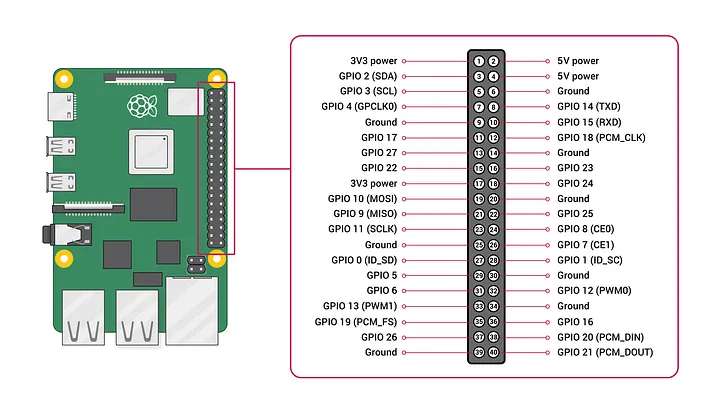
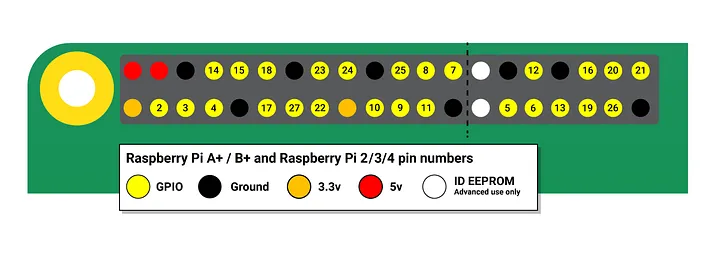
Keep the board orientation and numbering legend with a saved diagram. Rotating the board or an illustration changes where a pin appears on the page while its physical number remains the same.
Board Models and GPIO Software
A 40-pin header layout and a GPIO software backend are separate parts of a project. GPIO Zero passes a device's pin specification to a pin factory, which provides the underlying GPIO implementation. Its pin-factory documentation lists model support; the documented backend for Raspberry Pi 5 is lgpio.
Record the board model, operating system, GPIO library and backend alongside the pin map. Earlier 26-pin Raspberry Pi boards and Raspberry Pi Pico boards have their own connector references. The exact model name resolves an ambiguous reference such as “Raspberry Pi B pinout.”
Using a Pinout in a Project Plan
A button input is a useful numbering example. If the project identifies GPIO17, the physical-header record is pin 11. The software record then states which numbering convention the library expects.
A larger project might group several indicators or inputs. GPIO Zero's advanced recipes show grouped device objects such as LEDBoard. Record each group's member GPIOs as well as its software name, so a group label can be traced back to individual connections.
For an I2C or SPI peripheral, the record also includes the bus and device identifiers. Pin choice, interface selection and software configuration belong together in the same project record.
Make an Interface Record
Use one entry per proposed signal or interface:
- Board: Exact model and matching connector reference.
- Connection: Physical pin, GPIO label and circuit purpose.
- Function: General input/output or named interface assignment.
- Software: Library, numbering convention and GPIO backend.
- Attached device: Part identity, pin labels and electrical interface.
The Raspberry Pi 4 board gallery identifies the separate board connectors. My monitoring and interfaces guide covers the Raspberry Pi and Victron interface equipment I used in the van. Keep project-specific decisions in the build decision log.
Raspberry Pi Pinout Questions
Does GPIO17 mean physical pin 17?
No. GPIO17 is physical pin 11. Physical pin 17 is a 3.3 V supply connection.
Are all 40 positions general-purpose inputs and outputs?
No. The connector includes supply, ground and HAT-identification positions alongside the general-purpose GPIO signals.
Does the same header layout mean every software example works on every Pi?
Header position, peripheral assignment and software backend are distinct. Match all three to the board model and library being used.