A computer area is one part of my Transit interior. Making it useful for a working day means thinking beyond the desk: how work starts, what remains reachable while it is underway and how the van returns to living space afterward. I would plan those transitions before adding another screen or deciding that a different location solves the problem.
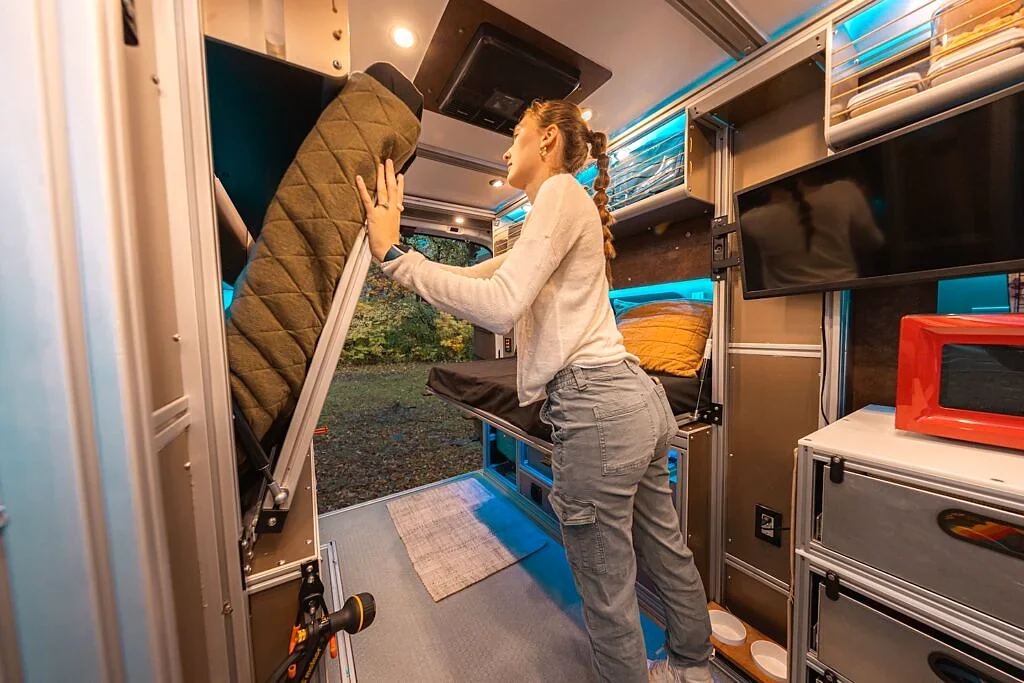
My documented build uses aluminum extrusion, black and gray carpet, butcher-block countertops, a bed area and a computer area. I use those choices as a physical reference for the work surface, storage and changeovers that need to fit together during an ordinary day. This guide develops a workday planning method around the actual tasks, resources and changeovers involved.
The output is a workday card that connects the place, equipment, schedule and reset. It belongs alongside the full-time camper guide, while keeping a different purpose: choosing how a particular day will operate rather than selecting the whole camper layout.
Describe The Work Before Drawing The Office
I would start by listing the work I expect to do. Writing, reviewing documents, taking calls and processing large files create different demands. A desk selected from a photograph tells me little about whether those activities fit the planned day or the resources available at the intended stop.
For each activity, I would identify the objects used, the attention required and whether a connection is necessary. I would also note any fixed deadline or meeting time. This gives the design a real brief. It prevents a general desire for an office from turning into an equipment list without a clear operating purpose.
I would keep the list short enough to represent an ordinary day. The aim is to design for repeated work rather than every task that might occur once. An unusual task can have a separate arrangement. Giving that distinction a place in the plan helps keep the normal setup manageable.
Separate Connected Tasks From Offline Tasks
I would mark which tasks genuinely need a live connection and which can be prepared or completed offline. That distinction can change where work happens and how the day is ordered. A document already available locally may fit a different time from a scheduled conversation or a large transfer.
The offline state needs checking before leaving the connection I intend to use. I would confirm that the relevant files open and that the necessary notes are accessible. Merely seeing a filename in a cloud folder is not the same as having the complete working file available in the intended arrangement.
I would keep transfer and synchronization tasks visible on the workday card. A task is not finished because editing is complete if its required delivery remains pending. Likewise, I would avoid repeating an uncertain submission without first checking what actually happened. The plan should distinguish local completion from confirmed receipt.
Give The Workday A Location Decision
I would choose a location based on the work planned there. That means considering the connection, surroundings, available time and ability to carry out the task without repeated interruption. A place suitable for a short email session may not suit a scheduled conversation or a longer period of focused work.
I would record the information I actually checked rather than rely on the destination's general reputation. The relevant details might include whether I can stay for the intended period, whether a facility is open and whether the connection works for the specific task. Each belongs to that place and time.
I would also decide what makes the location unsuitable and which alternative I can use. This is a practical scheduling decision, not a promise that one resource will always be available. A clear fallback lets me change the day deliberately instead of spending the first working hour searching without a plan.
Test The Actual Task, Not Just A Connection Icon
For a connection-dependent activity, I would test the actual workflow before its fixed start. That could mean opening the required service, loading the needed document or checking the meeting application. An icon showing a connection does not establish that every part of the task is ready.
I would note the outcome in plain language. The file opened, the service accepted the login or the test conversation worked at that moment. I would keep those observations tied to the location and conditions instead of treating one successful check as a permanent performance claim about the equipment.
I would also separate a service problem from a local setup problem. If a document is unavailable because access has changed, moving the van may not help. If the required file was never prepared offline, that is a preparation issue. Naming the actual failure makes the fallback more useful and avoids random changes.
Make A Start-Of-Work Sequence
My start sequence would include the physical setup and the digital preparation. I would put the work surface into its intended state, retrieve the necessary items and check the next scheduled commitment. The sequence should identify anything moved from the bed, kitchen or aisle so it can be restored later.
I would keep the most frequently used objects together without assuming they must remain permanently spread out. A small setup can be useful when it has a clear retrieval route. A permanent setup can be useful when it does not interrupt other activities. The routine determines which arrangement deserves the space.
I would rehearse the start with ordinary belongings present. A desk that works in an empty interior may compete with groceries, clothing or a bag during travel. The usable-space layout guide helps draw those relationships; the workday sequence checks them in the order they actually occur.
Check The Work Position With A Real Session
I would place the actual equipment at the proposed work position and use it for a representative task. That gives me more useful feedback than measuring the surface alone. I would note where the hands, screen, documents and other objects end up as the task develops.
I would observe which movements are awkward or repeated. Reaching around a cable, clearing a surface for notes or moving a screen to open a compartment are specific findings. I would keep the description concrete rather than announce that a position is universally comfortable or ergonomic from one short trial.
The next change should respond to the observation. A different object position may solve the issue before the furniture changes. If the arrangement still needs a structural revision, I would carry the exact task and dimensions into a mockup. This keeps the work area tied to what I do rather than a generic office image.
Include Documents And Small Work Items
A computer-only drawing can leave out the things that accumulate during a day. Notes, a phone, a drink, a headset or a paper document may need space at the same time. I would include the items actually used, then identify which stay on the surface and which return to storage between tasks.
Each object needs a place that remains available during the work session. A small item placed on the bed may become a problem when another person rests there or when the workday ends. The plan should show where it goes next rather than assume a spare surface will always be free.
I would also give temporary paperwork a clear endpoint. It may be scanned, filed, returned or discarded through the normal process. The van's limited surfaces make an unresolved paper pile more noticeable, but the useful response is a simple workflow. Adding a drawer does not decide what the papers are waiting for.
Draw The Cables In Work And Travel States
I would record where each cable runs while the work area is operating and where it goes for travel. The two states are different. A lead that reaches the computer may still cross a storage opening, an aisle or another moving part of the interior.
My interior wire-route record explains the broader documentation approach. For the desk, I would focus on the external connections used during an ordinary session. The record should identify the actual equipment and connection without assuming a compatible replacement from appearance alone.
I would include the pack-away sequence in the same drawing. If a cable must be disconnected before a surface folds or an item moves, that step belongs on the reset card. The point is to make the normal operation obvious, rather than discover the dependency each time the living space changes state.
Treat Power As A Task Budget
I would begin with the devices and activities I intend to support, then connect those needs to the documented electrical setup. A list of equipment ratings alone does not describe an entire workday. The time each device is used and the other loads occurring alongside it also belong in the record.
The electrical-system guide provides the actual build reference. This workday plan does not add a wiring recipe or assume that every mobile office can use the same arrangement. I would keep any electrical change in its own design record with the exact equipment and verified information.
For the operating trial, I would record the starting state, work activities and observed end state using the available system information. That gives me a personal planning record without inventing an independence figure. If the day changes significantly, I would note the difference before comparing it with another session.
Plan Calls As Scheduled Activities
A call needs more than a place to put the computer. I would check where I sit, what is in view, how surrounding activity affects the conversation and what has to remain undisturbed for its duration. The location decision should happen before the meeting begins.
I would place the necessary notes and materials within the actual work area. If I need to retrieve something from another compartment halfway through, I would check whether that movement interrupts the session. This is a useful rehearsal because it reveals small dependencies that a static desk photograph misses.
I would also decide what happens if the chosen location becomes unusable. The fallback could be a previously checked place or an agreed change to the activity. The important part is that the next action is known. I would avoid filling the plan with untested alternatives that look reassuring but cannot support the scheduled task.
Keep Shared Space Agreements Specific
When another person shares the van, I would compare the working period with their ordinary activities. Sleeping, cooking, dressing and moving through the interior may use the same space or nearby storage. A general agreement to keep quiet does not resolve every physical overlap.
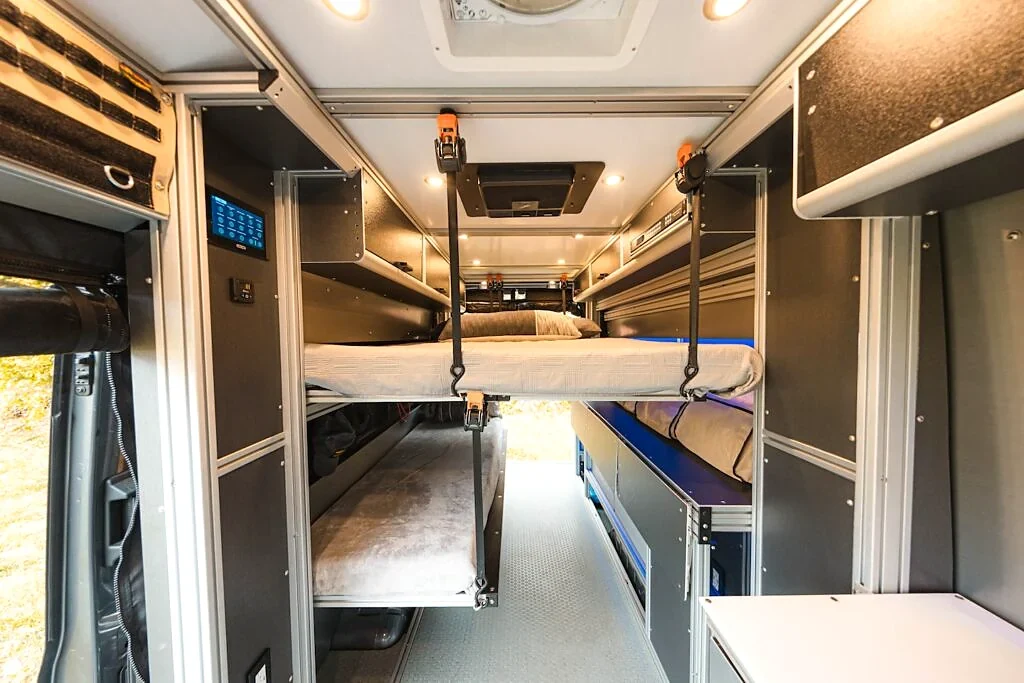
I would identify the actual period and tasks that require coordination. One person may need a surface for a short meeting while the other needs access to a drawer. Naming that conflict makes a practical arrangement possible. It may involve timing, a different storage location or using an outside facility for one activity.
I would record the agreed arrangement and revisit it after a trial. The goal is not to assign permanent priority to work or leisure. It is to make the shared day predictable enough that both can happen. A small change to the schedule may work better than adding furniture to an already busy interior.
Give Meals A Place In The Workday
If the same counter or table supports work and food, I would define the changeover explicitly. Where do the work items go? Which surface becomes available? What needs to be put away before preparation begins? The galley workflow helps follow the meal side of that sequence.
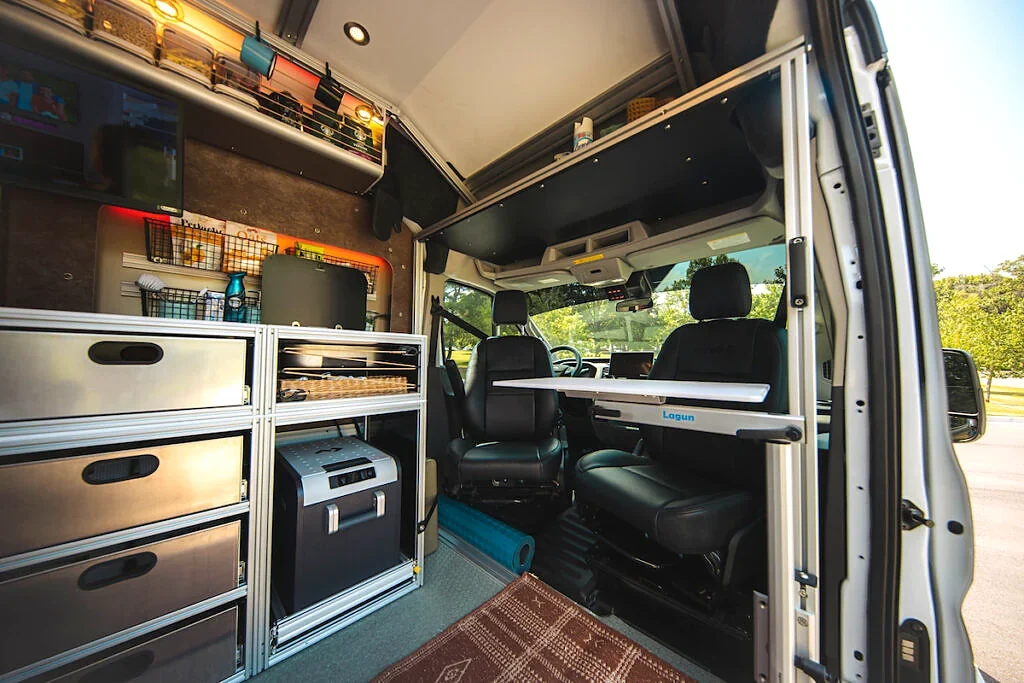
I would include the return from lunch as well. A work arrangement that takes several repeated clearing steps may need a simpler set of items or a different time block. The useful measure is the complete transition, not whether a laptop technically fits beside a plate.
I would avoid solving every shared-surface issue by extending the work session through meals. The van should still support the day I want to have. Setting a clear break and reset can reveal whether the arrangement is manageable and which objects are creating unnecessary handling.
Make The End Of Work Visible
My end sequence would identify the actual delivery or saved state, close out pending tasks and return physical items to their travel or storage positions. That makes a distinction between stopping for the day and merely leaving equipment open in the living area.
I would keep uncertain outcomes visible. If a transfer is pending, the note should say so and identify the next check. If a message or file has a confirmed receipt, I can record that result. This prevents the next session from beginning with duplicate work or an assumption that an unfinished task was completed.
The physical reset matters too. Cables, documents and loose accessories need their intended locations before the space changes function. A short repeatable routine can make the same furniture support work and living without requiring either activity to remain half assembled all evening.
Prepare For A Day Without The Preferred Workspace
I would choose a few tasks that can move to another arrangement and identify what is required to do them. That could mean reading, outlining or organizing files already available locally. The alternative should contribute to the real work rather than become a vague instruction to be productive somewhere else.
I would pack only the items needed for that fallback and keep their handling route clear. If the alternative requires taking a large part of the office out of the van, it may be more useful to change the schedule. The fallback deserves the same honest accounting as the normal setup.
After using it, I would record what worked and what was missing. A fallback confirmed by an actual task is more useful than a long list of possible locations. Over time, that creates a small set of known arrangements while preserving the fact that availability can change.
Work Through A Mixed Workday Example
For a planning example, I would put an offline writing task in the morning, a scheduled conversation later and a file delivery at the end. These are example activities, not a claim about my business schedule or a tested connection. They help show why one location or setup may not suit the whole day.
Before starting, I would confirm the local files and arrange the surface for writing. Before the call, I would check the required service and the actual surroundings. Before finishing, I would verify the delivery result and identify anything still pending. Each stage has a different completion condition.
I would then add lunch and the living-space reset. If those transitions require moving the same equipment repeatedly, I would change the order or narrow the setup. The example is complete when I can describe where the items go and how the next activity begins, not simply when the calendar contains three work blocks.
Keep A Small Workday Card
The card would list the location, main activities, fixed commitments, connection-dependent tasks and reset. I would add a short field for observed problems and the next revision. This should fit on one working page, with detailed equipment records linked separately.
I would also note the starting arrangement when it matters. A temporary table, a different screen position or a changed storage load can alter the session. Keeping that context lets me compare actual configurations instead of assuming every day used an identical setup.
The card should become shorter as the routine settles. Repeated steps can be summarized once they are reliable, while unusual dependencies stay visible. The purpose is a dependable working day with fewer decisions repeated from memory, not another detailed document that needs more attention than the work itself.
Judge Changes By The Task They Improve
I would review a proposed office change by naming the problem first. Does it reduce repeated setup? Make a needed item reachable? Separate a work period from a shared activity? A clear answer helps distinguish a useful improvement from equipment that only makes the space look more like an office.
I would try the smallest reversible change before committing to a new built component. Moving a container or changing the session order can reveal whether the original diagnosis was right. If a furniture change remains useful, the trial provides a concrete brief for the next build step.
I would preserve the arrangements that already work. A larger surface might improve one task while blocking another part of the van. The workday record should show those tradeoffs. The best office arrangement is the one that supports the required work and returns predictably to the rest of daily life.
Record A Task Handoff Before Changing Locations
When a task will continue after moving, I would leave a short handoff to myself: the last completed action, the next action, the file being used and any unconfirmed result. That is more useful than reopening several applications and trying to reconstruct the state from memory.
I would keep the handoff with the work rather than put private details on a general trip checklist. The travel card only needs to show that a task is ready to resume and whether a fixed commitment remains. This separates the operating routine from the contents of the job itself.
Before departure, I would confirm which files or actions still depend on the current connection. A pending transfer deserves a clear status. If it can continue later, I would record that choice; if the current task requires a confirmed receipt, I would verify that result before treating the handoff as complete.
At the next location, I would begin from the saved next action. If the environment has changed, I would check only the dependencies relevant to that step instead of repeating the entire setup indiscriminately. The method makes interruptions easier to manage while keeping uncertain effects visible.
This is also a useful way to compare workspace arrangements. If the same task can be stopped, packed, moved and resumed without losing its place, the routine has a practical result. That result does not require claiming a measured productivity increase or a universally suitable office layout.
Questions About A Camper Van Workspace
Do I Need A Permanent Desk?
I would decide from the actual work and the changeover routine. A permanent position may suit repeated tasks, while a shared surface may fit a smaller setup. I would compare both with the same equipment, work session and end-of-day reset before assigning permanent interior space.
How Should I Evaluate A New Connection?
I would check the services and activities the day depends on, then record the result at that location and time. A general connection indication is only a starting point. The important outcome is whether the actual task can begin and whether its required delivery can be confirmed.
What Should I Improve First?
I would choose the repeated interruption that can be described most clearly: an unavailable file, a blocked compartment, a difficult changeover or a location mismatch. Solving that problem gives the next trial a useful comparison. The workday should become more predictable before the equipment list becomes longer.