A PCB, or printed circuit board, supports electronic components and connects them through patterned copper conductors. The copper forms traces, pads and larger conductive areas on or inside an insulating structure. Components mounted to those connections turn the board into an electronic assembly.
Understanding a PCB starts with three things: the board's layers, the components fitted to it and the connections between them. This reference explains those parts before following a design from schematic to fabrication and assembly.
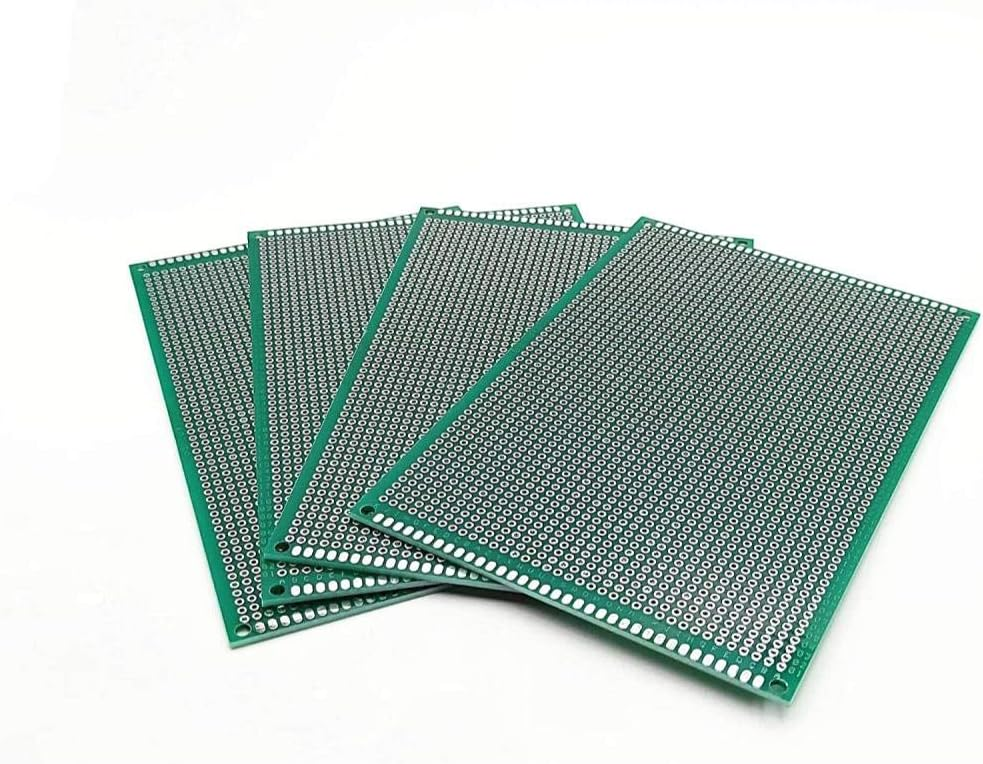
PCB Structure: The Board Beneath the Components
The materials visible on a circuit board have different jobs:
- Insulating base: Provides mechanical support and separates conductors. FR-4, a glass-reinforced epoxy laminate, is a common rigid-board material.
- Copper: Forms the electrical connections. It can appear as narrow traces, soldering pads or broad areas called planes.
- Solder mask: Covers selected surface copper while leaving connection areas exposed. Green is common, but the color does not identify the board's circuit function.
- Silkscreen or legend: Adds component identifiers, outlines, connector labels and orientation marks.
A multilayer board combines conductive and insulating layers into a stackup. SOLIDWORKS' PCB introduction explains the board structure and the terms used for its conductive features.
How a Printed Circuit Board Connects a Circuit
A schematic describes the intended electrical connections. The PCB layout gives those connections physical positions and routes:
- Trace: A copper path between connection points.
- Pad: An area for a component lead, terminal or other connection.
- Via: A conductive connection between copper layers.
- Plane: A larger copper region that can serve a power or reference connection.
A line that disappears beneath a component may continue elsewhere or connect through a via. Inner-layer routes are hidden within the board. The layout and schematic provide a fuller picture than a photograph of one surface.
Common Printed Circuit Board Components
The board supports the parts; each part contributes a particular function to the circuit. Common examples include:
- Resistors: Used to set currents, divide voltages and establish circuit conditions.
- Capacitors and inductors: Used in energy storage, filtering and power-conversion circuits.
- Diodes: Provide directional conduction and are used in rectification, lighting and protection circuits.
- Transistors: Used for switching or amplification.
- Integrated circuits: Combine functions such as processing, memory, sensing or voltage regulation.
- Connectors: Provide electrical interfaces to cables, other boards and external equipment.
Total Phase's circuit-board overview relates these component groups to the jobs performed by an electronic assembly.
Through-Hole and Surface-Mount Parts
Through-hole components have leads or pins inserted through board holes and soldered. Surface-mount components attach to pads on the board's surface. One assembly can use both mounting methods.
What Labels Such as R1, C2 and U3 Mean
These are reference designators. Common prefixes include R for a resistor, C for a capacitor, D for a diode, Q for a transistor and U for an integrated circuit. The number distinguishes one component from another.
R1 identifies a location in the design; it does not give the resistor's value. Match the reference with the schematic and bill of materials for the value or part number. Cadence's component-identification guide explains designators and orientation markings.
PCB Materials and Board Types
Layer count and physical construction describe different aspects of a board. A single-sided PCB has one copper layer; a double-sided board has two. A multilayer PCB includes additional copper layers within the insulating stack.
Rigid boards retain their shape. Flexible circuits use bendable insulating materials, commonly polyimide. Rigid-flex construction joins rigid sections with flexible sections. Metal-core constructions add a metal base for thermal management in applications such as lighting.
Material choice, copper geometry and layer arrangement affect electrical, thermal and mechanical behavior. Ansys' PCB overview discusses construction choices and the engineering considerations behind them.
From PCB Design to Fabrication and Assembly
PCB development turns an electrical idea into a repeatable physical arrangement. The main stages answer different questions:
- Schematic: Which components are needed, and which terminals connect?
- Component selection: What are the actual part numbers, pin assignments and package dimensions?
- Layout: Where do the parts sit, and how do traces, vias and planes connect them?
- Design checks: Does the layout match the intended connections and manufacturing rules?
- Fabrication: Produce the bare board's conductive patterns, insulating layers, holes, finishes and markings.
- Assembly: Place and solder the selected components, followed by the applicable inspection and testing.
Fabrication and assembly are separate stages. A bare PCB is the board itself; PCBA commonly means the printed circuit board assembly with components fitted. Altium's PCB guide describes the transition from board construction to populated assembly.
Compared with wiring every connection individually, a defined copper layout makes the same connection pattern repeatable across manufactured boards. Modern layouts can place compact components on multiple surfaces and route connections through several copper layers.
A Practical Way to Read a Circuit Board
Begin with its identity, then work toward individual connections:
- Find the board name, model and revision marking.
- Locate labeled connectors and their pin identifiers.
- Use reference designators to match visible components to the schematic.
- Read orientation marks alongside the component's pin diagram.
- Follow the relevant connections in the schematic and layout.
A component's shape identifies its package more readily than its exact electrical role. A small black package may contain different devices, so combine the board identifier, component marking and circuit documentation when identifying a part.
PCBs in Van Electronics and Related References
A Raspberry Pi is a familiar example of an assembled circuit board with integrated circuits, connectors and supporting components. Its external headers provide connection points to other electronics.
For the related CVF references, continue with the Raspberry Pi 4 board diagram and the GPIO numbering guide. My monitoring and interfaces guide identifies the Raspberry Pi and Victron interface equipment I used in the van.
A solderless breadboard offers a different way to arrange a prototype: components and jumper wires plug into reusable contacts. The PCB versus breadboard comparison explains that distinction in more detail.
PCB Questions
Is a PCB the same as an assembled circuit board?
A PCB can refer to the bare board. PCBA identifies the assembly with its components fitted. Keeping the two terms separate makes fabrication and assembly discussions clearer.
Is every PCB made from FR-4?
No. FR-4 is common for rigid boards, while flexible, metal-core and other constructions use different material arrangements.
Does a green board have different functions from a blue board?
Solder-mask color alone does not describe the circuit. Its functions come from the conductive layout, fitted components and their connections.