Introduction
A breadboard board lets you connect electronic parts into a temporary circuit without soldering them together. Push a component lead or jumper wire into a socket and a metal contact underneath joins it to other sockets in the same internal strip. Move the lead, and you can change the circuit in seconds. That combination of visible layout and reversible connections makes a solderless breadboard useful for learning, checking a component, and testing a design before deciding how to build a lasting version.
The important skill is reading connections rather than counting holes. Two leads may look close together but remain electrically separate; two holes several positions apart may already be joined by a hidden strip. Once you can identify those groups, the board becomes a map of circuit nodes instead of a confusing grid. This guide explains the map, walks through an LED circuit, and shows how to read a breadboard diagram and plan progressively richer breadboard projects.
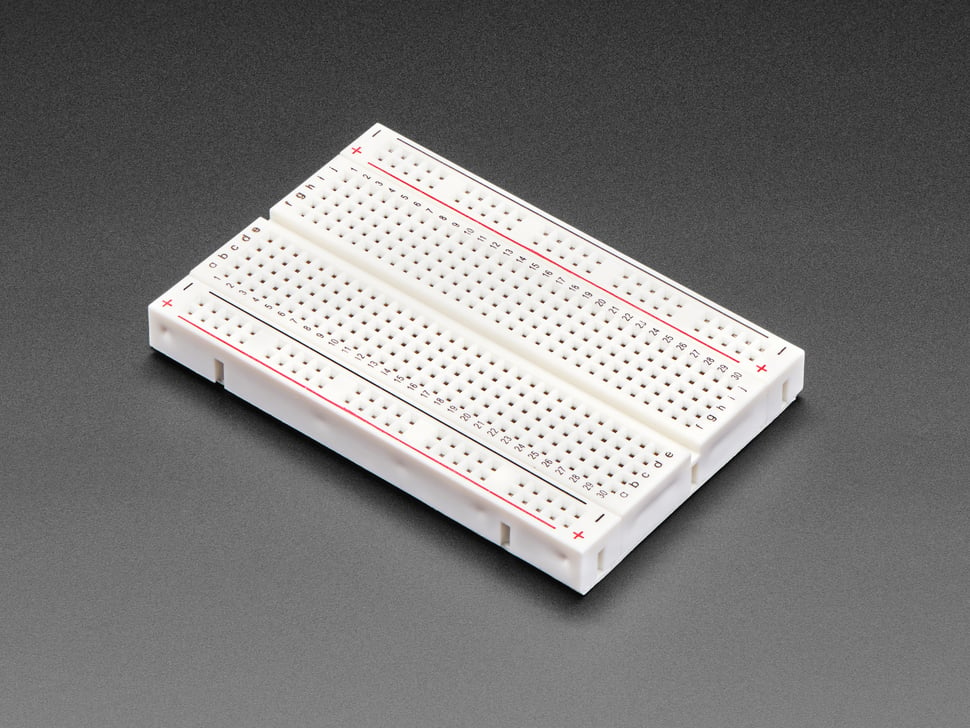
This page is an electronics reference alongside my records of the equipment used in the camper van. The camper van electrical-system guide documents that installed equipment; the examples here explain low-voltage prototype connections. A prototype can help you understand a signal or control idea, while the actual build record identifies the parts and connections in the van. Keep those two purposes distinct when reading any project photograph or schematic.
What is a Breadboard?
A solderless breadboard is a reusable base with a patterned set of sockets. Spring contacts under the plastic surface grip component leads and jumper-wire ends. Groups of contacts are already joined internally. Those built-in joins replace some of the wires that would otherwise be needed to assemble a temporary circuit. The board does not contain a battery, processor, or universal circuit: its job is to hold parts and provide known connection points. A rail marked with a plus sign is merely a labeled strip until a supply is connected to it.
The name has a history in early electronics experimentation, but a modern electrical breadboard is the plastic socket board used for solderless prototyping. It differs from perfboard, where separate holes usually need deliberate soldered connections, and from stripboard, whose copper strips are cut or joined to form a more permanent layout. It also differs from a finished printed circuit board, where a designed copper pattern forms the intended connections. A solderless board is easiest to rearrange; a manufactured board is built around a settled design.
Most familiar boards accept common through-hole leads and many dual-inline-package integrated circuits on a 0.1-inch, or 2.54-millimeter, grid. That spacing is a common pattern, not a promise that every component fits. A surface-mount IC may need a breakout adapter. A large terminal, heavy wire, or unusual lead shape may not make a reliable contact with the small socket. Compare the component package and the particular board before planning the layout.
Breadboards come in mini, half-size and larger formats, often identified by the number of tie points. A tie point is one socket position, not a separate circuit node. Five tie points within one terminal strip may all be the same node. A compact board saves space for a single LED test; a larger board provides room for multiple sections, bus rails and a chip across the center gap. The Adafruit breadboard and protoboard catalog illustrates how solderless sizes differ from solderable prototyping boards, while Circuit Specialists’ breadboard guide describes tie points, terminal strips and board-size choices.
Importance of Breadboards in Electronics
Breadboards lower the cost of trying an idea because a change usually requires moving a lead, not remaking a solder joint. A single resistor can be exchanged to compare LED brightness, a sensor lead can be moved to a different input, and a logic chip can be removed after its pinout is checked. You can make one change at a time, observe the result, and return to the previous arrangement. That simple cycle makes the circuit easier to understand than a tangle of permanent connections created all at once.
They also make electrical relationships visible. A circuit schematic represents components and nodes; a breadboard layout assigns those nodes to physical holes. Building the same circuit in both forms teaches a useful distinction: a line that crosses another line on a drawing does not automatically mean the lines join, and two wires that enter the same five-hole strip do join even if they arrive from opposite directions. The layout can be different while the circuit remains electrically equivalent. Digilent’s solderless-breadboard reference uses the node concept to explain this point.
Learning on a breadboard does not mean copying its physical layout into the final product. The value of the exercise is the verified relationship among power, return, signals and components. For the van, my monitoring and interfaces guide records the equipment used in the actual build. Breadboard examples in this article provide a way to reason about small electronic nodes; they are not a substitute for the installation record.
How Does a Breadboard Work?
Under a typical solderless breadboard are short conductive strips. Each strip connects a small group of sockets, commonly five holes in one numbered terminal row. The center channel separates the left and right groups. A10 through E10, for example, may be joined to each other, while F10 through J10 form a second group with no built-in connection across the gap. The next numbered row is another group. This pattern is why placing both legs of an LED in the same five-hole group bypasses the LED rather than putting it into a circuit path.
Longer strips near the edges are usually called bus strips or power rails. Their red and blue lines are visual conventions. A red rail can be used for a positive supply and a blue rail for the return, but color does not create a voltage. Some rails are interrupted at the middle, and rails on opposite sides of the board are usually separate until you join them. Mini breadboards may have no side rails at all. The visible marks tell you how the board is intended to be organized; the actual internal contacts tell you what is connected.
When you insert a lead, its metal surface presses against the contact hidden inside the socket. A second lead in the same strip reaches the same electrical node. A jumper wire deliberately joins two otherwise separate nodes. A resistor, diode, LED, switch or IC sits between nodes and contributes its own electrical behavior. The board itself only supplies contact paths. SparkFun’s illustrated breadboard tutorial shows the contacts beneath a small board and the separation across the central channel.
You can confirm a board’s pattern with a continuity meter while it is unpowered. Adjacent holes in the same strip should show continuity; holes across the center gap should not. Test the start and end of a long rail if a colored line appears to continue through the middle. This check is valuable when the board’s markings are faint, the model is unfamiliar, or a project diagram assumes a rail connection that your particular board does not have.
Basic Components of a Breadboard
The plastic body holds the sockets at regular intervals. Metal spring contacts beneath it make the electrical connections and grip inserted leads. Those contacts are not exposed in normal use, so the top-side labels and the board’s documented pattern act as your map. The quality and fit of a contact matter: a lead that seems inserted but does not touch its spring can make a circuit intermittent. Repeatedly forcing oversized leads can also change how a socket grips later components.
Terminal strips form the central working area. On a common board, lettered positions A–E share a short strip at a given row number, and F–J share another. The center channel, sometimes called a gutter, divides the two banks. A dual-inline-package, or DIP, chip can straddle the channel so each pin has its own adjacent node. A chip placed wholly within one five-hole group can unintentionally join pins that should be separate. Check the package’s orientation mark and datasheet pin numbering before assigning the surrounding rows.
Bus strips run along one or both sides of many boards. They make a supply and return accessible in several places, but their length and segmentation vary. A printed plus or minus is a labeling aid. There can be two independent rails on each side, a deliberate break halfway down, or no rails on a small model. On some assemblies, binding posts or a mounted supply module provide a convenient entry point; their presence does not change the terminal-strip logic in the central area.
Jumper wires extend the board’s built-in network. A short solid-core jumper can bridge two rows; a premade male-to-male lead connects distant sockets. Leads with sockets at one end can connect to modules or headers that cannot be inserted directly. See the separate jumper-wire guide for connector styles and fit. A wire’s color is useful for a human-readable plan, but the wire’s endpoints—not its insulation color—determine its circuit role.
The parts inserted into the board complete the experiment: resistors limit current or set a voltage relationship; LEDs and diodes have polarity; switches open or close a path; capacitors, sensors and ICs add other behavior. Each part has its own pinout or value. A resistor can usually be reversed without changing its function, while an LED or polarized capacitor cannot be treated that way. The board makes their connections reversible, not interchangeable.
Electrical Connections and Layout
Imagine a standard row labeled 10. A10, B10, C10, D10 and E10 are one node; F10 through J10 are another. Neither side joins row 9 or row 11 by itself. The center gap is a physical reminder of that separation. A jumper from E10 to F10 joins the two row-10 groups; a resistor between E10 and F10 connects them through the resistor rather than shorting them. That difference is central to interpreting an electrical breadboard correctly.
The rail pattern deserves a separate check. A rail on the left and a rail on the right normally start as independent strips. If your design calls for the same positive supply on both sides, a jumper can connect the two positive rails; a separate jumper can connect the returns. A mid-rail break creates two sections even though the printed color may look nearly continuous. A circuit may work in its upper half and appear dead in the lower half because one rail segment was never linked. Map the actual board before trusting a photograph made with another model.
It helps to write a node ledger. For the LED example below, one node is “5 V supply,” another is “resistor output and LED anode,” and another is “LED cathode and return.” The ledger can include row addresses such as A10–E10, but the name describes the purpose. If you relocate the LED to another row, update the address while keeping the same three-node circuit. This is more reliable than memorizing a picture.
| Positions | Built-in connection | Meaning |
|---|---|---|
| A10–E10 | One terminal strip | Five sockets on one node |
| F10–J10 | A different terminal strip | Separated from A10–E10 by the gap |
| A11–E11 | Another terminal strip | Not joined to row 10 without a part or wire |
| Side rail, upper section | Model-dependent bus strip | Check whether a middle break divides the rail |
There are two ways to join distant nodes: add a jumper or place a component between them. A plain jumper creates a direct conductive link. A component changes the relationship according to its electrical properties. Confusing those two actions explains many failed first circuits. If a resistor is intended to sit in series with an LED, its legs belong in different nodes. If both legs share one strip, the resistor has been bypassed.
A meter helps separate layout errors from component behavior. With power removed, continuity can reveal a missing rail bridge or a jumper one row away from its intended address. With the appropriate circuit powered, a voltage measurement can show whether supply reaches the input node and whether the return is shared. Record where the probes touched. “The rail has 5 V” says little if the component is connected to an unbridged rail section elsewhere.
How to Use a Breadboard
Start with a small schematic or a written list of required nodes. Identify the supply, return and every connection between components. Then inspect the physical board: find the terminal strips, center gap, side rails and any rail breaks. Pick rows that leave room for parts and readable jumper paths. Place components so each lead enters the intended node; use wires only where the built-in strips do not already provide the connection.
Build the circuit with the supply disconnected. Compare the finished layout against the node list, looking especially at component polarity, supply-to-return paths and the row number of each lead. Connect a suitable regulated low-voltage source for the example circuit, then observe one expected behavior at a time. If it does not occur, return to the node list and test the path in sections. This procedure is more productive than moving several wires at once and losing track of which change mattered.
After a test, save enough information to reconstruct it: the circuit purpose, supply voltage, component values, pin numbers, row addresses and observations. A photograph is helpful, but a photo alone may hide a rail break or a wire end beneath another lead. Pair the photograph with a schematic or node ledger. The result is a reusable experiment rather than a temporary arrangement that vanishes when the parts are removed.
Setting Up Your First Circuit
A single LED and resistor provide a first circuit because the expected result is visible and the number of nodes is small. Use a regulated 5 V supply, an LED whose datasheet identifies its anode, cathode and forward-voltage range, a resistor selected for the intended current, two or three jumper wires, and a breadboard with a mapped supply and return rail. This example uses a nominal 2.0 V LED forward voltage at the chosen operating point and a 330 Ω series resistor. The approximate current is (5.0 V − 2.0 V) ÷ 330 Ω, or 0.009 A, about 9 mA. The actual LED voltage and current depend on the selected part and supply; the calculation shows why the resistor is included.
- Identify the board’s nodes. Find a five-hole group such as A10–E10 and a separate group such as A11–E11. Find the supply and return rails. If either rail is divided, use the section nearest the circuit or add the needed bridge deliberately.
- Put the resistor in the supply path. Insert one resistor leg into the positive rail and its other leg into A10. Those legs are in different nodes, so current reaching row 10 must pass through the resistor. A resistor that has both legs in A10–E10 would not serve this purpose.
- Place the LED across two rows. Put its anode into B10, which shares a node with the resistor output. Put its cathode into B11, a separate node. Identify the legs using that LED’s package marking or datasheet, not only a photograph of another device.
- Complete the return. Insert a jumper from C11 to the return rail. The complete path is positive supply, resistor, LED anode, LED cathode, return rail and supply return. The jumper from C11 works because it shares the A11–E11 strip with the cathode in B11.
- Inspect before applying power. Trace the path with a finger or a row list. The positive rail should not connect directly to the return rail. The resistor and LED must each bridge different nodes. Make sure the supply is connected to the rail sections you actually used.
- Power and observe. Connect the regulated supply and look for light. If the LED stays dark, disconnect power and check polarity, rail continuity, supply voltage, component seating and row addresses in that order. A meter can distinguish a missing voltage from an LED placed backwards.
- Change one variable. Try another suitable resistor value and compare brightness and measured current. Keep the supply, LED and wiring positions constant while making that comparison. Record the actual component value and what changed.
Adding a push button creates a second lesson. Place it in series so the path closes only when pressed. Many four-legged tactile switches internally join the two legs on each side, while the actuation joins the sides; the exact orientation follows the switch’s pin diagram. Straddling the center gap often keeps the two sides apart until the switch is pressed. A switch rotated ninety degrees can create a connection you did not intend, so check its unpowered continuity before using it as the control element.
A schematic for the first version would show supply → resistor → LED → return. It would not show A10, B10 or the physical shape of the breadboard. Those addresses describe one valid placement of the schematic’s nodes. SparkFun’s breadboard lesson demonstrates a button, LED and resistor circuit and compares a physical arrangement with its schematic. The example here uses a different row-by-row explanation so you can rebuild it on a board whose printed addresses may differ.
Common Breadboard Practices
Keep the layout readable. Short, direct jumper wires make it easier to see which node connects to which. Reserve a consistent color for supply, another for return, and other colors for signals when your wire set allows it. Color is a visual record, not proof of electrical identity; verify endpoints before interpreting a wire. Route longer jumpers around the main component area when they would obscure row labels or component markings.
Use a row ledger for every important connection. A useful line reads “A10–E10: resistor output, LED anode”; another reads “A11–E11: LED cathode, return jumper.” For an IC, add package pin numbers and the notch orientation. That record prevents a common mistake in which a builder follows the shape of a photo but places a lead one row away from the intended node. It also makes a later rebuild possible when the board is cleared.
Check bus rails early. Some have breaks in the printed line; others have a visually continuous stripe over separate metal pieces. Opposite side rails do not become one supply merely because both are marked red. On a larger board, measure continuity across the places where a break might exist. If the project needs the same supply in two areas, install and label the rail bridge deliberately. This avoids diagnosing a missing rail connection as a failed sensor or IC.
Plan IC placement before filling the board. A DIP device usually straddles the center gap, leaving each pin accessible on its side. Find pin 1 from the device’s mark and read the correct datasheet. Place support parts near the pins they serve rather than stretching every connection across the board. An IC that needs a nearby bypass capacitor should have that component connected between the specified supply and return nodes with a short path.
Make changes with the circuit unpowered, then recheck the affected nodes. A temporary breadboard contact can be moved in seconds, which also makes accidental one-hole shifts easy. When an experiment fails, test the supply, return and one stage at a time. Swap a suspect component only after checking that the circuit reaches it. Keep a known working arrangement or a clear photograph so you can return to it after a test.
Breadboard Diagram
A breadboard diagram should explain hidden connections, not merely reproduce the plastic surface. The simplified drawing below shows a common pattern: side rails, two five-socket groups in each numbered row, and a channel separating those groups. Lines inside the drawing represent conductive strips beneath the board. They are not added jumper wires. The actual rail length and any breaks still depend on the board in your hand.
Read the labels and the hidden-strip lines together. Row 10 has two groups, not one ten-hole group. Row 11 adds two more groups. The red and blue rails in this drawing do not join any terminal group unless a jumper or component is placed between them. The following sections explain how to translate this physical map into an electrical circuit.
Understanding the Structure
Letter labels identify positions across the board, while row numbers identify a position along its length. In the simplified example, A10 and E10 share a strip; F10 and J10 share a different strip. The same pattern repeats at row 11. The center channel is intentionally blank. A component crossing it can connect to one node on each side without shorting its own legs together.
Many diagrams use a red line and plus sign for a supply rail and a blue or black line and minus sign for return. These marks do not tell you the voltage. A rail labeled plus might be supplied at 3.3 V or 5 V in a particular project; another project might use a different arrangement. Write the actual voltage and return reference on your circuit record. If a rail has a break, draw that break. If you bridge it, draw the jumper. A reader should not have to infer either detail from the color alone.
Each terminal strip is a node until you connect it to something else. It is possible to connect two strips with a wire, a resistor, a diode or a switch, and each option creates a different electrical relationship. A schematic shows the intended relationship. A breadboard diagram shows where to place the parts so the relationship exists. Neither diagram can replace the component datasheet when pin numbering or polarity matters.
Board orientation can change how the labels appear in a photograph. Turning a board around does not change which hidden sockets share a strip, but it can make “top rail” or “left side” instructions ambiguous. Use printed row and column labels plus the component’s own pin marks. If a photographed board has no visible labels, trace its connections with a meter instead of guessing from the picture.
Interpreting Breadboard Diagrams for Projects
Start with a schematic when one is available. Name the nodes: supply, return, signal input, signal output and any intermediate connections. Then read the breadboard diagram to see which physical holes represent each node. A line drawn as a wire should land at both named nodes. A resistor symbol should separate its two endpoint nodes. If you cannot account for a component’s two terminals independently, pause and inspect the diagram more closely.
For the LED circuit above, the schematic path is supply → resistor → LED → return. A breadboard layout can put the resistor between the positive rail and A10, the LED between B10 and B11, and a jumper between C11 and the return rail. A10 and B10 are joined by the board’s hidden strip; B11 and C11 are joined by another. The schematic does not care whether the LED occupies row 10 and 11 or row 22 and 23. It cares that the same electrical nodes are connected.
A diagram of a switch or sensor needs more attention to the component’s pin arrangement. A four-leg button may have internally common pins on one side. A three-pin sensor may label its pins VCC, GND and OUT, but a visually similar package can use a different order. A transistor’s collector, base and emitter, or its gate, drain and source, must follow the actual part’s pinout. The transistor reference explains those terminal names; a particular datasheet supplies the package view.
Do not treat every crossing in a wire drawing as a connection. Some schematic conventions mark a joined crossing with a dot; physical breadboard diagrams show connections by wire endpoints and shared strips. Also distinguish a decorative board outline from an electrical rail. If a diagram shows a red stripe but no supply wire, the rail is not powered merely because it is red. If the rail is segmented, a wire to the upper section may not reach a component on the lower section.
Breadboard Projects
Breadboard projects are most useful when each one introduces a new circuit idea. Begin with a single current path, add a controlled interruption, then add a sensor or timing element. Build each version as a small circuit with a clear expected behavior. Record what happened and which node changed when you moved a part. A more crowded board is not automatically a more informative project.
Choose the project around the question you want to answer. If you are learning polarity, use an LED or another diode. If you are learning digital input, use a button and a defined input circuit. If you are learning switching, separate the control path from the load path and trace both. The component values and pin assignments come from the parts selected for that experiment, not from a generic photograph.
Beginner Projects for New Users
One LED and resistor. Use the circuit described earlier to learn supply, return, series components and LED polarity. Before connecting power, point to each node on the board and identify which hidden strip joins the adjacent holes. Change the resistor only after documenting the first result. The exercise teaches more when you can explain why each lead occupies a different row than when you merely make the light turn on.
LED with a push button. Add a switch in series and trace the circuit in both positions. Determine which of the button’s pins are internally paired with a continuity measurement. The LED should respond to the button because the path changes, not because the board has a special “button row.” This project separates the behavior of the part from the connections supplied by the board.
Two LED branches. Give each LED its own series resistor and connect the branches to a common supply and return. Observe that the rail is a shared distribution node while the components in each branch remain separately arranged. Put the two branches far enough apart to see their paths. A missing return on one branch then becomes easy to diagnose without disturbing the other branch.
Light-dependent response. A photoresistor can form part of a voltage divider whose output changes with light. Measure the divider output at two lighting conditions before attaching another device. The photoresistor is not itself a power source; its changing resistance alters the relationship between a supplied voltage and the measured node. The result teaches why an input signal can vary without rewiring the circuit.
Simple sound or timing. A buzzer or timer-based exercise introduces another output, but use the exact module or IC pinout supplied with the part. Label its supply, return and control connections before inserting leads. CYBER.ORG’s breadboard circuit sequence presents LED, button, photoresistor and sound experiments as a progression. You can use that progression to choose a next concept while building your own node map and observing your own parts.
Advanced Projects for Enthusiasts
A timed output. A 555 timer experiment adds an IC, timing components and a recognizable output. Place a DIP package across the center gap and map every pin against the selected device’s datasheet. Record the supply and return pins, the timing network and the output node separately. Change one resistor or capacitor at a time and compare the result. The value of this project is understanding how a component network sets behavior, not filling every socket on the board.
A control stage and an output stage. A transistor can let a small control signal change the state of another circuit path. Breadboard the control-side relationship and the output-side relationship as two named groups, then document where they meet. A device that looks like another transistor may have a different pin order, so identify the exact package. Keep the path through the board within the board and component ratings; a larger installed load belongs to an appropriately built connection system. That distinction is useful when a learning circuit suggests an idea for another project.
A sensor and microcontroller interface. A Raspberry Pi or another controller can read a signal from a small prototype, but its GPIO connector is not a set of interchangeable power pins. Map the selected signal, supply and common reference by physical pin number and signal name. The Raspberry Pi GPIO pinout guide separates those identifiers. Keep a record of the software pin name as well as the breadboard row, because the two address different parts of the system.
Several interacting stages. Combine a sensor, timing or logic stage and an indicator only after each stage works independently. Mark the common supply and return, give intermediate signals names, and draw a schematic before rearranging the physical rows. As the circuit grows, shorter jumpers and deliberate placement matter more. A long unlabelled wire that crosses several components can make a correct schematic difficult to recognize on the board.
Advanced experiments also reveal when a solderless board stops being the right physical medium. Contact resistance, intermittent leads, stray capacitance and long jumpers can affect a sensitive or fast circuit. A successful functional prototype can therefore lead to a more stable perfboard or PCB layout with documented connections. Translate the verified schematic and measured behavior, rather than tracing the exact path each jumper happened to take.
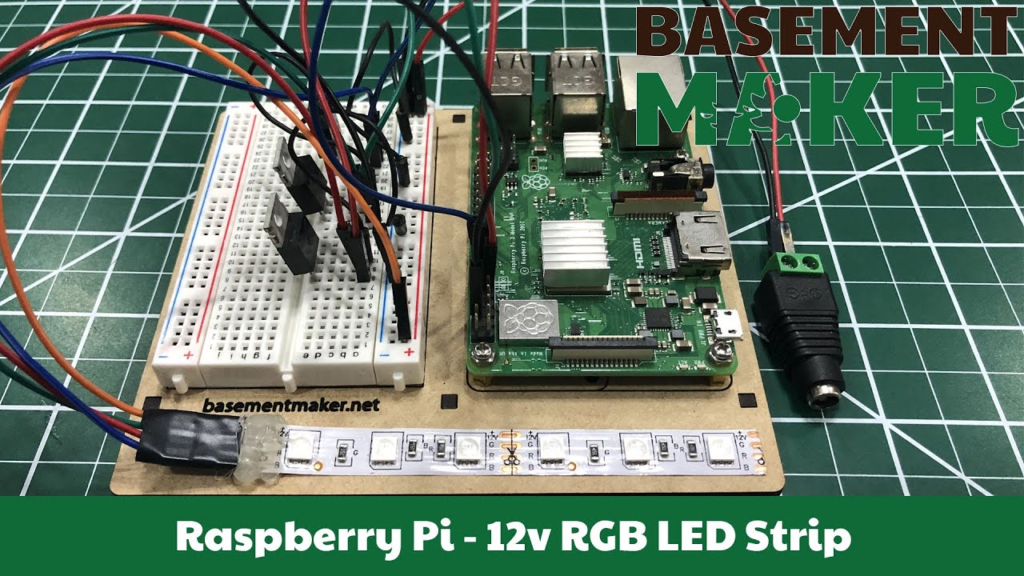
The pictured arrangement shows how a breadboard can organize connections beside a controller; it does not provide a complete component list or pin-by-pin schematic for that particular build. For any advanced project, the useful record is the one you create from the actual parts: component identities, pin numbers, supply levels, node names, observed behavior and changes made between versions. Those details make the result reproducible and keep an interesting photograph from being mistaken for a complete circuit design.